
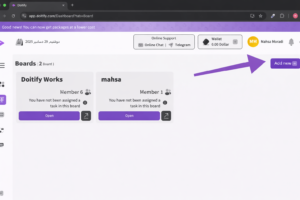
Here are the steps to create a new board in Doitify based on the screenshot:
1. Click on the “Add New” Button #
Click on the “Add New” button located at the top-right corner of the screen.
-
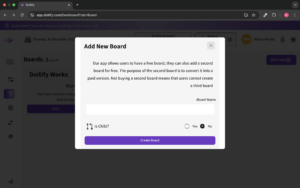
“Board Name” Field:
-
In this field, the user must enter a name for the new board.
-
-
“Is Child?” Option:
-
Yes: If the user wants this board to be a sub-board under another existing board, they select Yes.
-
No: If the board should be independent, the user selects No.
-
-
“Create Board” Button:
-
After entering the board name and selecting the type, click the “Create Board” button to create the new board.
-
-


