Consistency is the key to success

Loading...

Doitify
Pricing Enterprise Contact Us
View Categories

New Board

2 min read

Here are the steps to create a new board in Doitify based on the screenshot:

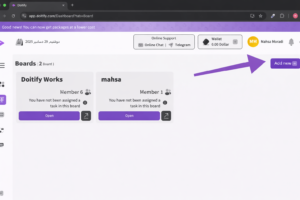
1. Click on the “Add New” Button #

Click on the “Add New” button located at the top-right corner of the screen.
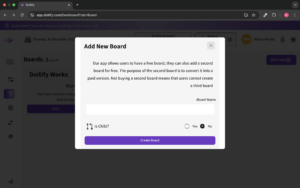
  • “Board Name” Field:

    • In this field, the user must enter a name for the new board.

  • “Is Child?” Option:

    • Yes: If the user wants this board to be a sub-board under another existing board, they select Yes.

    • No: If the board should be independent, the user selects No.

  • “Create Board” Button:

    • After entering the board name and selecting the type, click the “Create Board” button to create the new board.

    • In the “Add New Board” popup, the “Is Child?” option lets you decide whether the new board you create should be a sub-board under another board or an independent board.

      What’s the difference? #

      1. If you select “Yes”:

        • The new board will be created as a sub-board under an existing board. This means it will be connected to a parent board in a hierarchical structure.

        • This is useful when you have a large project and want to break it down into smaller sections. For example, if you have a project with several parts, you can create a sub-board for each section.

      2. If you select “No”:

        • The new board will be created as an independent board, with no connection to any other board. It will be a separate project.

        • This is useful when you want a board that stands alone and doesn’t need to be linked to other boards.

      Why should you choose this option? #

      • If your project is large and requires organization into different sections, choosing Yes and using sub-boards will help keep everything organized.

      • If you want completely separate boards with no connection to other projects, choosing No allows you to create boards that are independent of each other.

      Conclusion: #

      This option helps you decide whether to create a new board as a sub-board (linked to another board) or as an independent board, allowing you to organize your projects in the best way for your needs.