
Guide to Joining a Board #
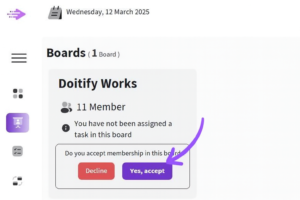
To join a board, you first need to open the board section. From the left sidebar menu of your dashboard, click on the Board tab. If you have been invited to a board, a membership request will appear for you in this section.
This request shows information such as the board name, the number of members, and your task status, so you know exactly what you’re joining.
To accept the invitation, click the “Yes, accept” button. Once you do:
 #
#
-
You will officially become a member of the board
-
You will be able to view tasks assigned to you
-
You can participate in discussions, teamwork, and planning
-
You gain access to files, messages, and project-related resources
If you don’t want to join, you can choose “Decline” to reject the invitation.
This process is designed to make sure you join any board with full awareness and by your own choice.


